Sense & Scale

A site to explore cultures, cities, and computing at varying senses and scales. Updated by Ar Ducao, with content from classes at NYU, MIT, CUNY and more.

Contact: see syllabi

  • [post in progress] TODAY’S AGENDA Follow-up from midterm presentations. Lecture: Traffic & appcessory paradigms, by Brian Langel, Dash & NYU CS. Break Let’s practice literature review. Groups. Varun/Graham/Justin Greg/Matt Michael/Bartosz/Tong Tania/Clàudia Kania/Dimas Will Chanyeon Some Lit Review Resources: Google Scholar Google Patents ACM Digital Library (free access from an NYU or…

    [post in progress]

    TODAY’S AGENDA


    ASSIGNMENT FOR NEXT WEEK

    • If you haven’t already, finish posting your midterm slideshow, and your write-up.
    • If your write-up doesn’t have a bibliography and citations, add this to your write-up: cite at least 3 relevant sources and add a bibliography (“Works Cited”). USE MLA CITATION STYLE.
    • Download TileMill and register for a free Mapbox.com account.
    + ,
  • I love midterm presentations. It launches the transitional period in which I start stepping back, and the students start shaping the class in their own way. Our guest critic David Briggs, a director of digital marketing, said that the presentations were inspiring and energizing, and I completely agree. Many senses…

    I love midterm presentations. It launches the transitional period in which I start stepping back, and the students start shaping the class in their own way. Our guest critic David Briggs, a director of digital marketing, said that the presentations were inspiring and energizing, and I completely agree. Many senses and many scales were considered by this wide range of projects, and it’s always exciting to see ideas start to coalesce into solutions. We’ve spent quite a bit of class time exploring various urban and environmental issues, as well as some of the technologies that can be used to explore these issues. It was great to see this reflected strongly in all of the midterm projects.

    Going forward, I noticed two common weak spots that I aim to address in the remainder of the term. One was a lack of research literature review. Leaving this part out often makes a project seem naive, uninformed, or underdeveloped, so we will spend a future session going through an example process of lit review.

    The other weakness is a lack of consideration for a user or audience: who the user is, what the user wants, when and how the user will interact with the project. Persona design, play testing, and user testing are all important parts of this process. We have some great guest lecturers for this topic in April, which will hopefully allot enough time for students to address this aspect of their projects.

    Conceptualizing and making an initial prototype is hard work, and there are a lot of facets that must be addressed just to get to that first prototype. I think many developers, myself included, spend so much initial time focusing on technical and functional issues that we overlook how important conceptual validation is at the earliest stage. I’d like to get some feedback in class as to how to tackle validation earlier on.

    TODAY’S AGENDA


    + ,
  • [Post in Progress] Announcements Columbia’s IoT Mini-Symposium http://projects.studio20nyu.org/ny-tenants/ NYU Urban Democracy Lab Visions of the Connected Home: attend and/or present Boston Chloride level (with Catherine D’Ignazio/Emerson/Public Lab) http://publiclab.org/tag/sensor-journalism Sensor Journalism Webcasts State of the Map Transportation Camp Progress reports and brainstorms: midterms Varun/Graham/Justin Michael/Bartosz/Tong Tania/Clàudia Kania/Dimas Will Greg/Matt Chanyeon Follow-ups on…

    [Post in Progress]
    + ,
  • Measured human behavior = capacity for behavior change. Widely accepted in other municipal pursuits, this concept is still under-acknowledged in the field of waste management, as guest lecturer Kate Mytty discussed in her presentation of waste tracking research conducted in the Indian cities Pune and Muzzafar Nagar. Muzzafar Nagar’s informal…

    Measured human behavior = capacity for behavior change.

    Widely accepted in other municipal pursuits, this concept is still under-acknowledged in the field of waste management, as guest lecturer Kate Mytty discussed in her presentation of waste tracking research conducted in the Indian cities Pune and Muzzafar Nagar.

    Muzzafar Nagar’s informal trash pickers, who live on sorting and selling waste to vendors who use the waste as raw materials, are not organized or recognized by the government. Often from the very underprivileged classes or slums, these trash pickers have internalized an intricate, 47-category system for sorting waste. The categories include predictable categories like paper and metal, and range up to the most lucrative category of all, human hair, which is resold at up to $20 per kilo. Most categories sell for cents per kilo.

    Kate observed this intricate sorting system, an informal example of quantification, playing out in a similar manner when she researched the volume and demographics of residential waste in Pune. Through a local NGO, she organized a couple dozen college students to survey the volume of waste, household size, and household type in several residential areas of varying income: a kind of waste census. She found that the average Pune resident throws away about a pound of waste per day (as compared to almost five pounds from the average American), and that 30-50 percent of the city’s waste is from high-income residential areas.

    These kinds of numbers, combined with the fact that Pune could save more than $400,000 per year if it were to systematize the recycling currently conducted by informal waste pickers, suggest the power to quantification in the waste management sector.

    In the US, where the affordances of waste management systems and societal norms perhaps make for more straightforward quantification, there are a number of sensors that can be applied, particularly methane sensors at the landfill level, and weight sensors at the individual level. At the individual, “quantified self” level, the combination of passive sensing, active logging on the part of the individual, and incentive systems combine to power a real transition from waste to reuse, allowing individuals not only to be more aware of what and how much they waste, by also to be more aware and motivated to reuse materials before they hit the wastebin.

    Waste is a universal topic, and I was pleased to see Kate’s presentation generate such a participatory discussion amongst our class. Topics included negative versus positive incentives, the particular metrics in use by waste management systems today, the narratives being formed around waste tracking, e-waste, economic incentives, and DSNY’s focus on the NYC school system as a next step in improving waste-making behaviors. Varun, who grew up in India, highlighted the importance of attitude change in the process of capacity change: even if a person knows how much he is wasting, he won’t necessarily stop throwing used bottles out the car window if he isn’t taught the ramifications of this attitude.

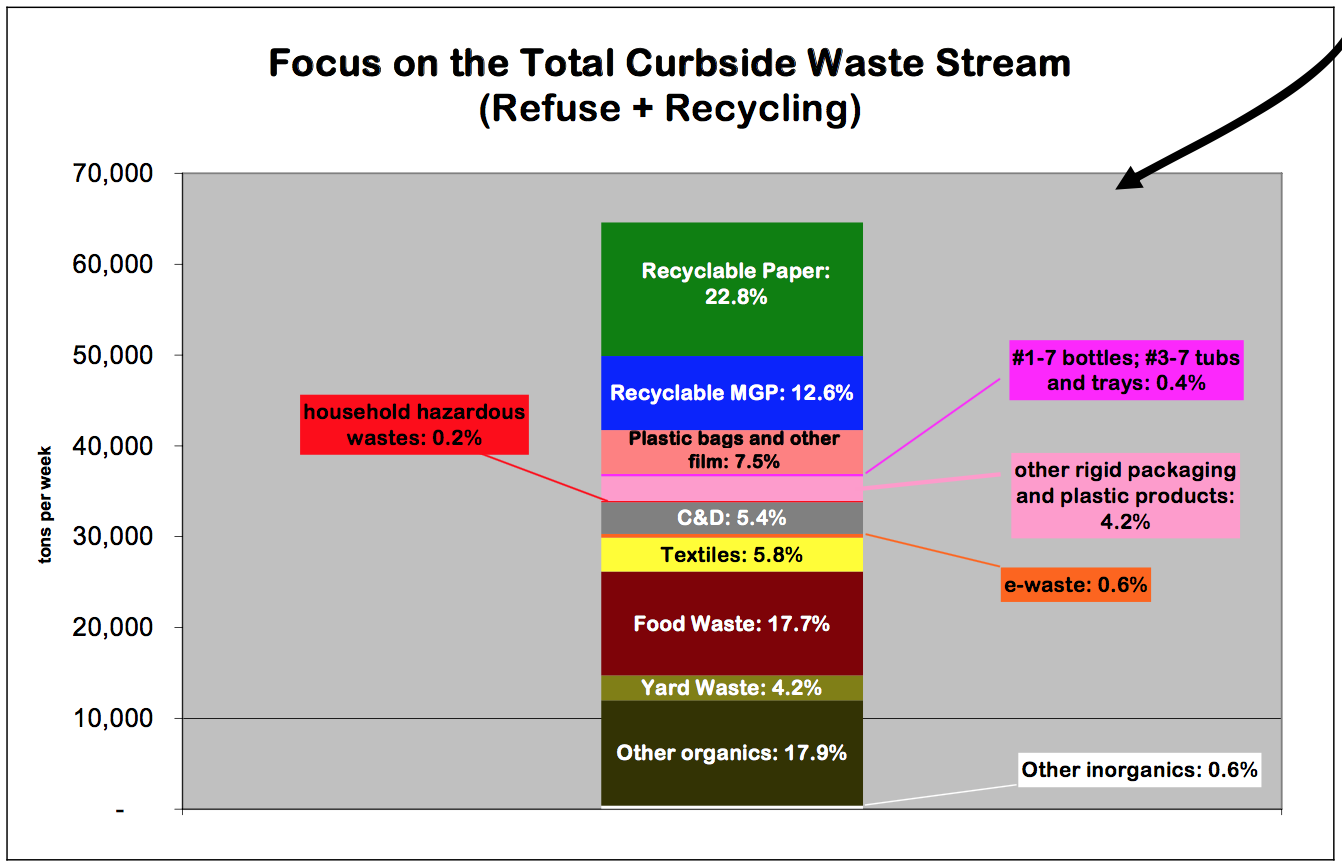
    NYC 2004-2005 Waste Characterization Study. Graphic courtesy Graham Henke.
    NYC 2004-2005 Waste Characterization Study. Graphic courtesy Graham Henke.


    TODAY’S AGENDA

    ASSIGNMENTS FOR NEXT WEEK

    • Write a short midterm project proposal. Please include
      • Preliminary Background / Prior Work / Lit Review, with relevant discussion of previous lectures
      • Your project concept. Why is it significant? How does it fit into “Quantified Self” and “About Town” (smart cities)?
      • What you aim to make and present on March 24
      • Your teammates. I encourage you to work in groups.
      • Your timeline
      • Technical considerations (materials, supplies, tools, questions)
      • Possible challenges
    • Optional: if you plan to develop further in iOS, try to write code to send me an in-app email. By finishing today’s crash course on your own, you will be able to do this.


    + ,
  • While it’s not generally feasible to learn how to build an iOS app from scratch in one three-hour session, the aim of this crash course is to help you to take the existing Bluefruit LE app and modify it to collect data from any Arduino-compatible sensor. How This Tutorial Works For each feature that…

    While it’s not generally feasible to learn how to build an iOS app from scratch in one three-hour session, the aim of this crash course is to help you to take the existing Bluefruit LE app and modify it to collect data from any Arduino-compatible sensor.

    How This Tutorial Works

    For each feature that you add to the app, the subtasks are written out in English (pseudocode), but there are no code snippets in this tutorial. After you try it, let me know if code snippets would have helped you learn–I might add them later. If you find that you’re stuck and need some help, I pasted all the snippets into a file, which is linked at the end of the tutorial.

    Prerequisites

    Before the crash course, be sure that you have

    1. Acquired an analog sensor, Arduino Uno, and Bluefruit LE breakout module. You must also have an iOS device running iOS 8 or higher, and a Mac computer running Xcode 6 or higher.
    2. Connected the analog sensor to your Arduino Uno’s A5 pin and checked the data in the Arduino serial monitor.
    3. Connected the Bluefruit LE to your Uno and completed the Bluefruit LE tutorial.
    4. Downloaded the Bluefruit LE app from the App Store and checked that data is being transmitted from your sensor system (sensor+Uno+Bluefruit) and displayed in the Bluefruit LE app.

    Getting Started

    Download the source code for the Bluefruit LE app here. We will modify this code in three ways:

    1. Add location and time data to each sensor value, creating a new “SensorRecord” class.
    2. Write SensorRecords to an array.
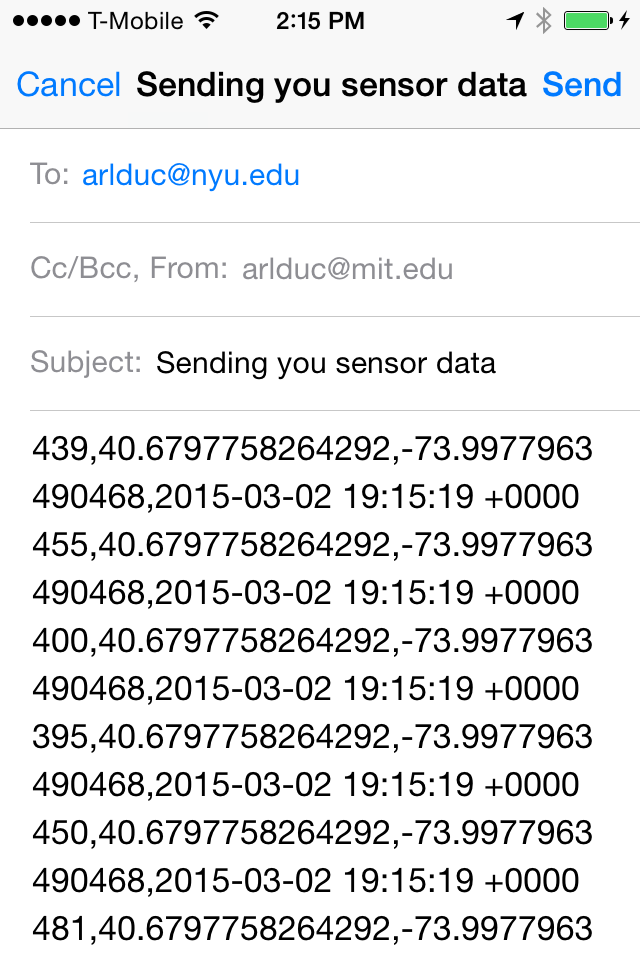
    3. Give the user the option to email the array of SensorRecords as a list of CSVs (comma-separated values), which can then be imported into spreadsheet, GIS, and other environments for visualization and analysis.

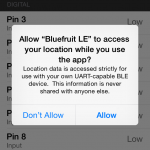
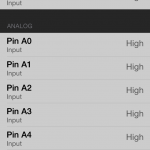
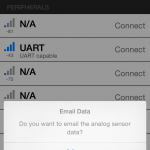
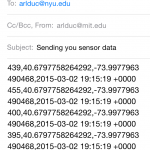
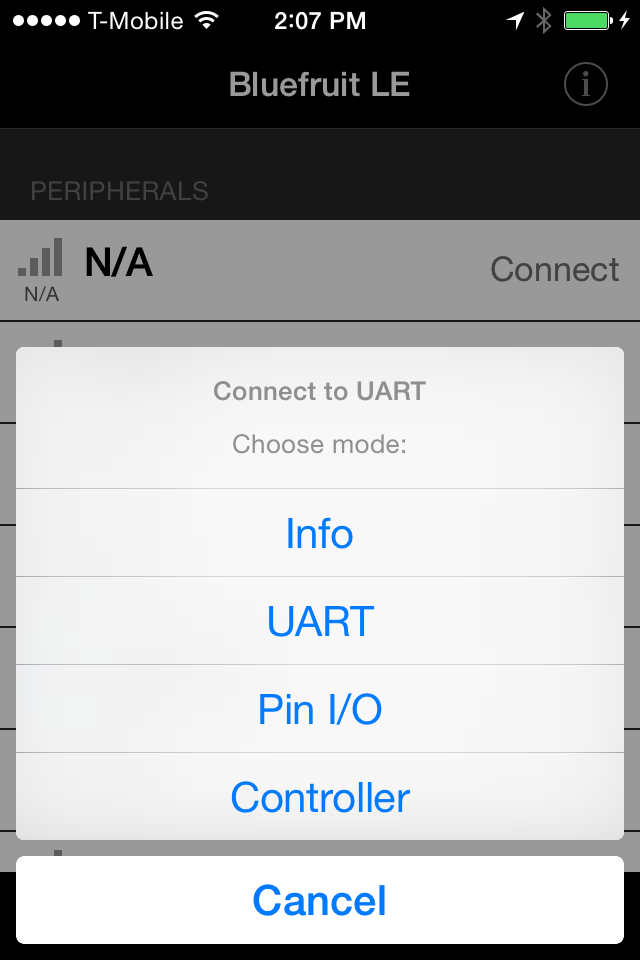
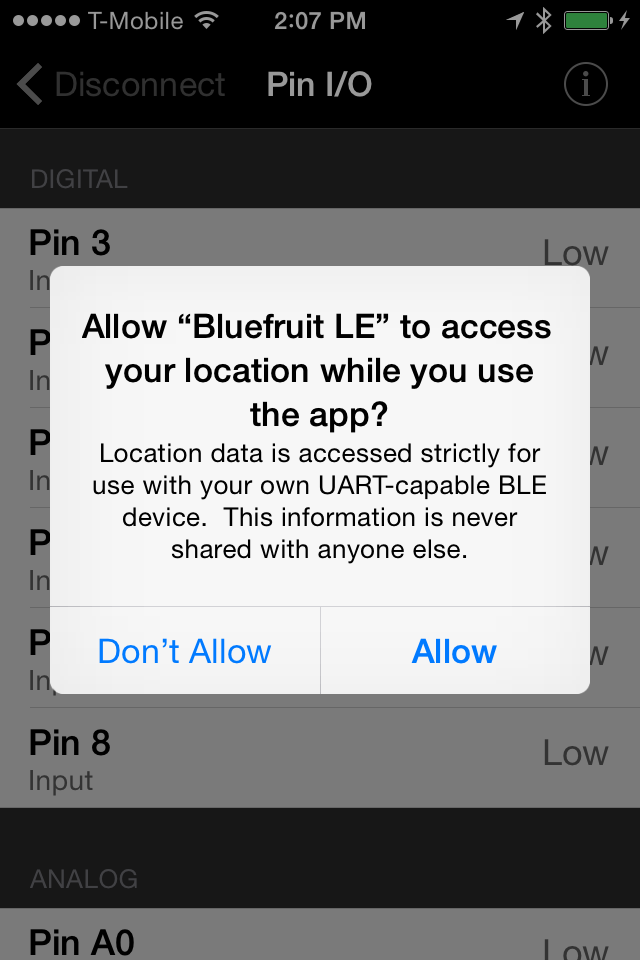
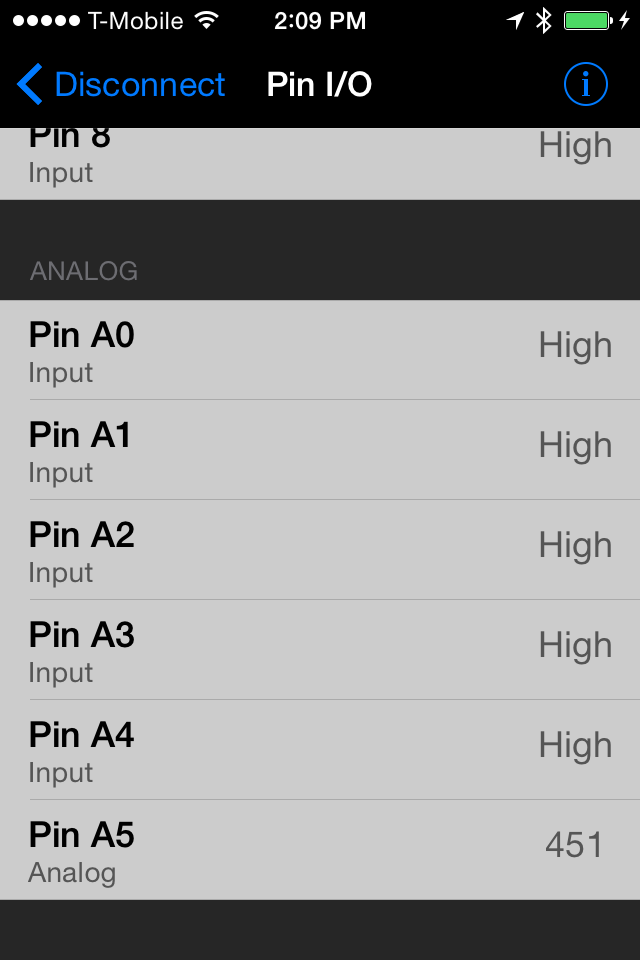
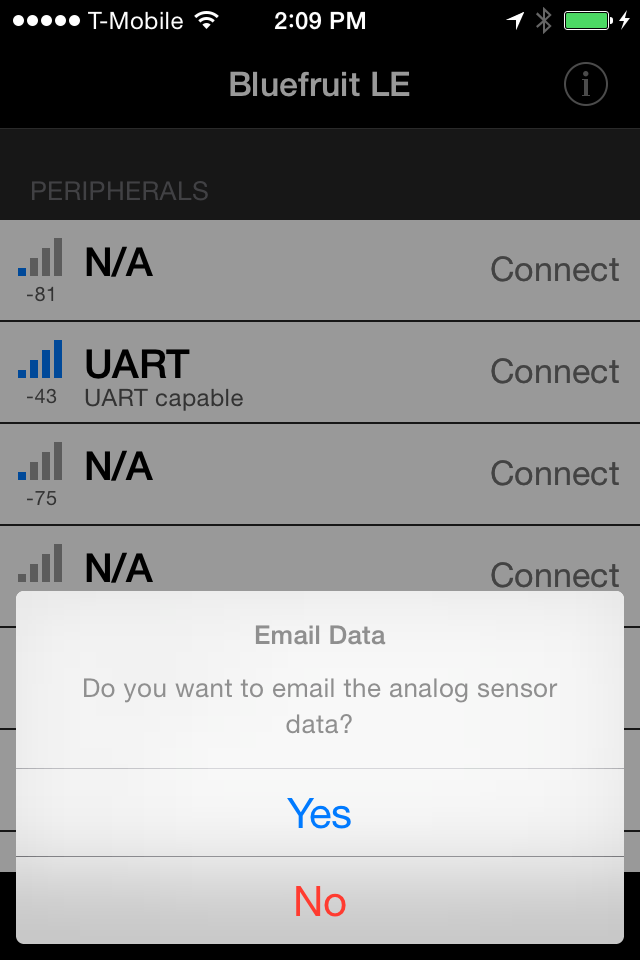
    After you complete these modifications, your app should display a succession of new elements like those in the screenshots below. When interacting with the app, you are given the option to email your sensors values when you “Disconnect” from your sensor system.
    IMG_2362 IMG_2365 IMG_2366 IMG_2367 IMG_2368 IMG_2370

    I found the location element to be the most complicated since it involves issues of user privacy and permissions, so we will save that part for last.

    Step 1: Getting Acclimated in Swift

    If you have never programmed for iOS in Objective-C, take this Apple tutorial to get acclimated to the iOS development environment with Objective-C. Now that Apple has introduced the Swift language to be simpler and less error prone than Objective-C, we’re starting to see more codebases written in Swift, including the Bluefruit LE app.

    Swift, which has been called “Objective-C without C,” is meant to employ concepts and syntax closer to more modern languages like javascript or Ruby. It took me a day or so to get used to Swift syntax, and a few more days to understand the concepts of forced unwrapping / optional chaining (the reason you see so many “!” and “?” marks in Swift code), which is why I recommend the particular links below.

    Step 2: Writing Sensor Values to an Array

    In the original Bluefruit code, the pin I/O values displayed without being stored, so our first coding task is to store those values in an array. The Swift Tutorial: How to use an Array in Swift may be helpful for this task. We will first focus on the existing class PinIOViewController, which manages the numeric display for each I/O pin. In the class’s file PinIOViewController.swift, see if you can complete these subtasks to write the data to an array.

    1. In the variable declaration section, declare an array of type Int called sensorDataVal
    2. In the method processInputData, locate the lines where new analog values are processed. Hint: look for the comment “//Analog Reporting (per pin)”
    3. Write new analog values to sensorDataVal and println them to the output console.
    4. Try running the app on your device.

    You will need to make sensorDataVal available to the main viewcontroller, BLEMainViewController, so the values can be passed into an email. In the class’s file BLEMainViewController.swift, see if you can complete these subtasks to write the data to an array.

    1. In the variable declaration section, declare a private array of type Int called previousSensorDataVal 
    2. In the method navigationController, locate the else clause that indicates a return from the PinIOViewController. Hint: look for the name ConnectionMode.PinIO
    3. In this clause, load pinIoViewController’s data into previousSensorDataVal
    4. Try running the app on your device.

    Step 3: Emailing Sensor Values

    In BLEMainViewController, we will set up an alert to ask the user if she wants to email the sensor data, as well as relevant email functionality. To learn about alerts in iOS, NSHipster’s explanation of UIAlertController may be helpful. To learn about sending in-app e-mails, check out Send Email In-App – Using MFMailComposeViewController with Swift. Now see if you can complete these subtasks in BLEMainViewController.swift:

    1. In the same else clause that indicates a return from PinIOViewController, add a UIAlertController to ask the user whether to send an email of sensor values. Add a UIAlertAction for if the user answers YES, and a separate UIAlertAction for if the user answers NO.
    2. Now modify the YES UIAlertAction to send an email. You will need to add 3 additional methods, based on the Send Email In-App link above:
      • configuredMailComposeViewController (where you will write the values from previousSensorDataVal out as a String into the email)
      • showSendMailErrorAlert
      • mailComposeController
    3. Make BLEMainViewController a subclass of MFMailComposeViewControllerDelegate.
    4. Try running the app on your device.

    Step 4: Adding Location and Time Data to the Mix

    If you made it this far, congratulations! You are almost finished. If not, don’t despair, all the code is written out at the end!

    Our final step is to add location and timestamp data to each sensor value. This means that we will now record a group of values for each sensor reading, not just one, so it makes sense to convert our sensorDataVal array from an array of Int to an array of a class we create: SensorRecord.

    iOS offers a Core Location Framework to query location data based on the device’s built-in GPS, bluetooth, and wi-fi modules. Of this framework, we will include the CLLocation library in our previous Swift files, BLEMainViewController.swift and PinIOViewController.swift, as well as a new Swift file that we create called SensorRecord.swift.

    Before you get started in this section, take a look at the Apple Sample Code Locate Me to see how the CLLocation library works. A new, improved privacy feature in iOS 8 is that all apps are programmatically required to request authorization from the user to employ Core Location services. You can read more about it in NSHipster’s post on Core Location in iOS 8. Also take a look at this StackOverflow discussion on Getting a very simple Swift CoreLocation example to work; it helps in culling relevant CoreLocation code into a few lines. After reviewing these resources, try these subtasks:

    1. Link CoreLocation.framework to your app target (see instructions here)
    2. Add the line “import CoreLocation” to the head of your BLEMainViewController.swift and PinIOViewController.swift files.
    3. Create a new SensorRecord.swift file with two variables. Force unwrapping by adding a “!” at the end of each variable declaration:
      • an Int called sensorMeasurement
      • a CLLocation called locationInfo
    4. Make PinIOViewController a subclass of CLLocationManagerDelegate
    5. Add two new variables to PinIOViewController:
      • A private CLLocationManager called locManager. This variable will manage GPS connection and user authorization.
      • A private CLLocation called currentLocation. Enable forced unwrapping on this variable.
    6. In PinIOViewController, set up the locManager in the init method. You will need to
      • set locManager’s delegate to self
      • set locManager’s desiredAccuracy to kCLLocationAccuracyBest
      • request permission if device is running iOS8 or higher
      • startUpdatingLocations for locManager
    7. In PinIOViewController, add a new method called locationManager to poll for new GPS data. You can optionally add an error-handling method.
    8. In PinIOViewController, modify sensorDataVal to be an array of SensorRecords instead of an an array of Ints.
    9. In BLEMainViewController, modify previousSensorDataVal to be an array of SensorRecords instead of an an array of Ints.
    10. Try running the app on your device. If it works, you can now deploy the app to email you sensor data!

    Step 5: The Working Code

    The working code snippets are in this file, but you will still need to figure out where in the pre-existing Bluefruit LE code you should paste these snippets. We will take a look at this file together in class. If you need to use this “cheat sheet” beyond class, use the code’s comments and blocks to help!

    Secret Step If You Really Need It

    Download the final codebase from Github!
    + , , ,
  • What a difference a year makes. When she presented in my class last year, Jennifer Sta. Ines was a new colleague who presented her work as a GIS specialist for NYC DOT’s bike share program. Now Jennifer is both a friend and collaborator on the MindRider project, so it was…

    What a difference a year makes.

    When she presented in my class last year, Jennifer Sta. Ines was a new colleague who presented her work as a GIS specialist for NYC DOT’s bike share program. Now Jennifer is both a friend and collaborator on the MindRider project, so it was great to hear an update on her DOT work, as well as learn some of her techniques for examining data from the MindRider Maps Manhattan pilot study.

    Since Jennifer presented last year, NYC Bikeshare announced a two-year expansion plan to build additional CitiBike stations in Upper Manhattan, Brooklyn, and Queens. To prepare for this expansion, NYC Bikeshare is in the midst of a series of community meetings in the neighborhoods planned for expansion. At these meetings, neighborhood residents have a chance to mark local maps with what they think are the best and worst places for Citibike stations. This discussion of qualitative planning approaches was particularly useful as I look ahead to QSAT’s midterm presentations, in which feedback will be focused on usability. As these community meetings aim to demonstrate, qualitative information can be just as crucial as quantitative data in planning and executing technologies.

    Jennifer also spent some time this year talking about the “demand models” used to plan future stations. Demand models, or algorithms used to understand the demand on bikeshare stations across the city, consider a number of factors, including community input, previous station usage, time of usage, type of usage, existing bike routes existing truck routes, subway entrances, places of frequent taxi drop-offs, and major landmarks. The discussion provided a real-world example of how to our in-situ sensor data must often be analyzed in the context of other kinds of data to really help provide insights on city-scale problems.

    There were a number of student questions about the demand models, the community meetings, and other relevant topics, after which we proceeded to discuss MindRider briefly and use some of its data in a QGIS lab designed by Jennifer. Coming on the heels of Lela Prashad’s remote sensing discussion and lab, Jennifer’s presentation and lab provided a useful expansion of spatial concepts (from satellites to widely distributed in-situ stations) and skills (from raster-based to vector-based processing). It was also a great exercise for me, being a formerly frequent, but not very rusty, user of QGIS.

    As is the case with all of our class labs, the use of the skills learned will vary widely: some of the students will not use QGIS for their analyses, some are already used to deploying ArcGIS (a closed-source geographic information systems package with expanded functionality), and a few found GIS to be a useful, or at least intriguing, new tool for their work.

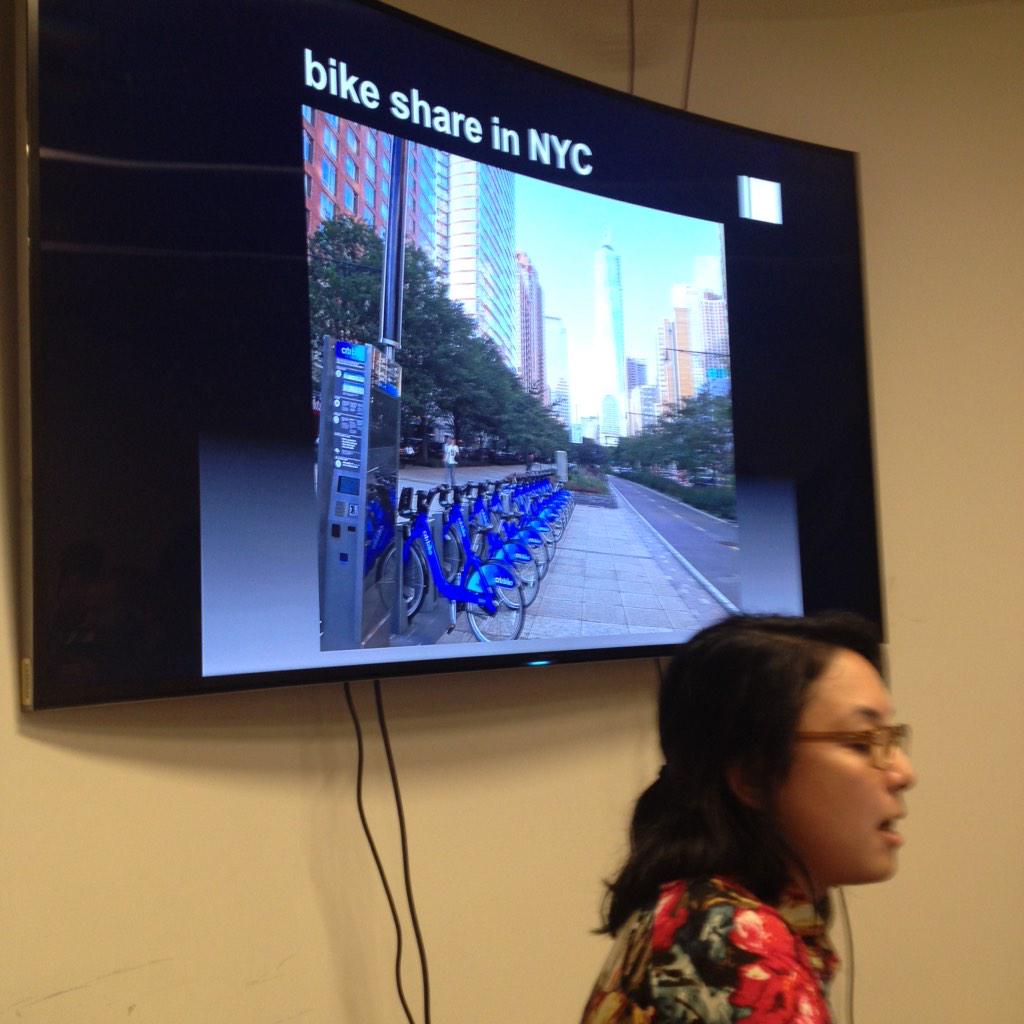
    quick photo of Jennifer presenting her work.
    quick photo of Jennifer presenting her work.


    TODAY’S AGENDA

    • Announcements
    • Guest Lecture: Transportation planning applications, by Jennifer Sta. Ines, NYC DOT.
    • Q&A.
    • Hands-on: simple analysis in QGIS
    • Break
    • Brief discussion of Midterm and Final GOALS.
    • Brief intro to iOS, in preparation for this week’s assignments.
    • Open lab session.


    ASSIGNMENTS FOR NEXT WEEK
    [action items are in orange]

    + ,
  • Today’s session followed the usual macro/micro format, starting with a guest lecturer to provide big-picture context, and ending with hands-on labs for more in-depth skill development. Our guest lecturer, Lela Prashad, is Chief Data Scientist at NiJeL.org and technical adviser to my MIT thesis project, OpenIR. She specializes in geospatial…

    Today’s session followed the usual macro/micro format, starting with a guest lecturer to provide big-picture context, and ending with hands-on labs for more in-depth skill development. Our guest lecturer, Lela Prashad, is Chief Data Scientist at NiJeL.org and technical adviser to my MIT thesis project, OpenIR. She specializes in geospatial data analysis, particularly with multi-spectral remote sensing, and she was the primary remote sensing instructor to ProPublica’s NewsApps team as they prepared to report on Louisiana’s eroding delta.

    After each student quickly explained their experience and/or understanding of remote sensing, Lela gave the class an overview of how the Earth is imaged by various satellite-based instruments; what the most commonly used datasets are and how to access them; how spectral, temporal, and spatial resolution plays a role in choosing the right data to answer a specific research question; and how remote sensing can be used not just to find answers, but also to provide background and context for the questions that we will explore via our self-deployed in-situ sensors.

    Lela then introduced MultiSpec, a free software application by Purdue University, used to analyze and process spectral data. Its functions include land use classification, side-by-side comparisons, and derivation of quantitative imagery like NDVI (normalized difference vegetation index). MultiSpec is free, but for practitioners who have access or need for more in-depth spectral analysis, the closed-source package ENVI is an option.

    Students then explained their previous class experiments with environmental and bio-sensors, as well as what their midterm projects might be. Spectral tools had a clear application for some of the more Earth-oriented ideas, including Will’s historical/archeological idea, Graham’s bumpiness tracking idea, and Varun’s turf/lawn analysis idea. There may also be applications to Changyeon’s noise pollution idea and Tong’s pace-tracking idea.

    At this point, it doesn’t seem like the majority of student projects will employ spectral data for post-collection analysis, but I think the students appreciated learning about the existence of tools and datasets that may be useful for background research and future projects.

    After class, it was good to read and comment on the latest student blog posts–it helped me get a stronger sense of each student’s background, preferences, experiments so far, and ideas going forward. I really like having such a diverse group in class, but it can be a challenge to plan relevant material for such diversity, so the blog posts are helpful to me to prepare upcoming speakers and to adjust hands-on activities for upcoming sessions. A few highlights from the past week’s posts:
    the work of Varun’s friend Ben Kreimer
    – the pulse sensor experiment by Kania/Tanya/Claudia
    Claudia’s class scribing
    Tong, Changyeon, and Justin’s circuit experiments
    Dimas’s observations on the evolution of microcontrollers and rapid prototyping


    TODAY’S AGENDA

    • Announcements.
    • Guest Lecture: Remote sensing & in-situ data, by Lela Prashad, NiJeL.org
    • Q&A, Multispec exercise
    • Break
    • Open lab. Continue with Multispec, do some lit review, continue on with your sensors.

    NEXT WEEK’S ASSIGNMENTS:

    1. Explore some of the data resources Lela Prashad suggested (see her presentation link here, and her data source PDF here: Remote_Sensing_Resource_Links). How do they provide some context for your project idea? Write up a short lit review using Lela’s suggestions, and using your own resources.
    2. If you plan to participate in the iOS training on March 3: accept the Apple Developer Invitation if you haven’t done so, send Marlon (cc me) your device UDID,  and solder headers to your bluetooth sensor if you haven’t done so.
    3. Download QGIS in preparation for next week’s analysis exercises.
    4. LOOKING AHEAD (optional assignment, not required for this week): If you have a Bluefruit LE, try hooking it up to your sensor and download the iOS Bluefruit app to see the data readings on your phone.
    + ,
  • The range of student backgrounds and voices continues to engage, excite, and make for lively discussion and experimentation. As Anthony Vanky said during the MIT workshop, I take a “mile-wide, inch deep” approach to structuring graduate workshops, with the aim of giving students a fat set of tools for going…

    The range of student backgrounds and voices continues to engage, excite, and make for lively discussion and experimentation. As Anthony Vanky said during the MIT workshop, I take a “mile-wide, inch deep” approach to structuring graduate workshops, with the aim of giving students a fat set of tools for going a mile deep on their own projects.

    Some students are starting to form ideas for larger projects, which include (in no particular order): a chair timer (Graham), a modular/mobile/personal thermostat system (Justin), an exploration of NYC noise complaints (Changyeon), water and waste tracking stations (Greg), a bus tracker (Varun/Graham), and smart archeology and historic preservation (Will). Some projects will be more on the “quantified self” end of the spectrum, others will tackle the “smart city,” and some are somewhere in between. Some projects might take a meta-approach, as with our journalism student Claudia. Individual, environmental, or both? This semester, I expect all students to explain where their projects lie on this spatiotemporal spectrum, and I aim to give them tools to contextualize their work on this spectrum.

    In the meantime, I’m learning new tools for and from the class. I appreciated Varun’s discussion of SCOT v TD in his approach to technology, as well as Kania’s reaction to the “more engaging, more intimate, and more focused” nature of our class setting. I continue to believe that our work comes first, and we are all here to learn from each other, myself included.

    Our speaker this week, ProPublica’s NewsApps developer Al Shaw, gave a powerful guest lecture on data journalism’s unique ability to support text-based journalism, and how ProPublica’s NewsApps can extend data journalism beyond the dynamic range of the standard data visualization. He also explained his major 2014 project, a remote-sensing-based approach to Louisiana’s eroding wetlands and the changing nature (and location) of the Mississippi River Delta. For the resulting visualizations, imagery was obtained from the government, private companies, and also by ProPublica using citizen-science tools (hacked IR cameras mounted on balloons and kites) designed by Public Laboratory.

    Not only was it fascinating to see what Al had been up to since early 2014, when I helped teach a remote sensing workshop where Al was a student, but I think Al’s lecture helped set up a macro/micro approach that I aim to continue throughout the semester: a guest lectures to help us look at the macro-picture and major questions around ourselves and our environments, followed by hands-on activities to get us familiar with the micro-challenges of developing new technologies.


    TODAY’S AGENDA

    • Announcements. Class blog aggregator by Claudia coming soon.
    • FAQ on submission policy and my response time.
    • Al Shaw: Data Journalism and remote sensing at ProPublica.org
    • Q&A
    • Break
    • Working with a datasheet
    • Sensor experiments. Policy on borrowing sensors from me.

    NEXT WEEK’S ASSIGNMENTS:

    1. Post or send a picture + write-up of your sensor experiment. What do you see as your next steps? How did Al Shaw’s talk help you to think about structuring and researching your next steps?
    2. Accept the Apple Developer Invitation, which should be in your Inbox or SPAM folder. If you plan to participate in the iOS training, please send your iOS device’s UDID to Marlon Evans (me42@nyu) and copy me. (Click here to determine the UDID.) Let me know if you want to participate and can’t find a device. If you don’t want or need to participate, you can use a GPS shield instead.
    3. If you plan to participate in the iOS training and haven’t ordered a bluetooth module yet, do so now or plan to share with someone else. I recommend the nRF8001 Bluefruit breakout.
    4. Download Multispec and QGIS in preparation for next week’s remote sensing exercises.


    + ,
  • In today’s first session, we got situated with basic housekeeping + intros, some background lecture, and some hands-on exercises. I’m very pleased to see a few different departments represented in this class: ITP of course, CUSP (NYU’s Center for Urban Science and Progress), and Journalism. Students represent a wide range of previous…

    In today’s first session, we got situated with basic housekeeping + intros, some background lecture, and some hands-on exercises. I’m very pleased to see a few different departments represented in this class: ITP of course, CUSP (NYU’s Center for Urban Science and Progress), and Journalism. Students represent a wide range of previous experience, from animation, to computer science, to geography, to art. With such a range, I hope the class provides opportunities for interdisciplinary collaboration.

    During lecture and discussion, I asked students to share some experiences with their own personal tracking technology. Students talked about step trackers in gyms and as wearables, location trackers worn for marathon training, and apps to help quit smoking. The notion of behavior modification came up, and the role that personal psychology and active/passive sensing plays in motivating behavior change.

    While I made a lot of choices to include and not include certain concepts and technologies in the class syllabus, I had not considered including a session on the personal psychology of tracking devices. I think some of these concepts may be covered as we conduct user tests and think about social and ethical implications towards the end of the semester, but I’m going to keep thinking and looking for a way to support these considerations more strongly. Let me know if you have suggestions.

    And now… resources we discussed, and assignments.

    NYU Resources

    Lecture decks and additional reading


    Assignment

    • Finish connecting your photoresistor (if you plan to build a data-tracking instrument); use can the P-Comp site to help. Working in groups is fine.
      • OR write a detailed blog post on your observations and reflections on the class and the meaning of “quantified self” and “smart city.” You can use the lecture decks above as source material. If you chose the writing assignment, please write a solo post.
    • Email me a link to your web site, blog, or blog category for this class. If you don’t have a blog, consider setting one up– it’s a great way to collect and present your work. If you don’t want to do that, plan to email me weekly.
    • Look through the sensor list below and pick a sensor to experiment with in next class. Email me to reserve the sensor, and please share a few ideas for what you want to do with it.

    SENSOR LIST

    SparkFun Infrared Proximity Breakout – VCNL4000
    BOB-10901
    Optical Dust Sensor – GP2Y1010AU0F
    COM-09689
     Reed Switch (magnetic)
    Vibration Motor
    ROB-08449
     Alcohol Gas Sensor – MQ-3
    SEN-08880
    Piezo Vibration Sensor – Small Horizontal
    SEN-09198
    Carbon Monoxide Sensor – MQ-7
    SEN-09403
    Methane CNG Gas Sensor – MQ-4
    SEN-09404
    LPG Gas Sensor – MQ-6
    SEN-09405
    SparkFun Capacitive Touch Sensor Breakout – MPR121
    SEN-09695
    Load Sensor – 50kg
    SEN-10245
    Piezo Element
    SEN-10293
    Hydrogen Gas Sensor – MQ-8
    SEN-10916
     Anemometer Wind Speed Sensor w/Analog Voltage Output
     Fast Vibration Sensor Switch (Easy to trigger)
      Slow Vibration Sensor Switch (Hard to trigger)
      DHT22 temperature-humidity sensor + extras
      Pulse Sensor Amped
      Contact-less Infrared Thermopile Sensor Breakout – TMP007
    + ,
  • The Quantified Self About Town Tues, 12:10pm to 3:05pm. 721 Broadway, NYC, Floor 4, Room 15 How can we take advantage of the connected technologies transforming individual data to massively larger scales in time and space? From smartphones to wearables, from social media to quantified self, the aggregation and geo-location of…

    The Quantified Self About Town

    Tues, 12:10pm to 3:05pm.
    721 Broadway, NYC, Floor 4, Room 15

    How can we take advantage of the connected technologies transforming individual data to massively larger scales in time and space? From smartphones to wearables, from social media to quantified self, the aggregation and geo-location of data is becoming a major part of how our spaces, cities, and regions are assessed and planned.

    In this class, we’ll look at how we can design and deploy with some of the most commonly hackable instruments– microcontrollers, sensors, and phones– that collect environmental, social, biological, and personal data. Students will learn to access the computing and geo-visualization resources they need to deploy their own data collection instruments in the urban environment.

    The class will kick off with findings from a January 2015 workshop at MIT called “Physical Computing and Urban Studies,” in which students will consider the political, historical, and social underpinnings of how sensors are used in urban studies and planning.

    Student Prerequisites:
    • Interest in electronics and sensors. Experience in building and programming simple circuits is strongly recommended.
    • Please bring an Arduino Budget Pack (or equivalent components) to class.
    • Before the first class, please download Arduino and Processing. Additional software for class can be found in “optional supplies” below.

    Class Format

    • First part (60-90 minutes): Lecture, discussion, critique.
    • Second part (90-120 minutes): Hands-on building & testing. Early sessions will offer technical how-tos and labs, later sessions will offer open work time for your projects.

    Schedule

    • Feb 3.
      • Introductions. HCI context, MIT workshop findings. Survey of sensors and tools.
    • Feb 10.
      • Lecture: Data journalism, by Al Shaw, ProPublica.
      • Hands-on: microcontrollers and sensors.
    • Feb 17.
      • Lecture: Satellite & in-situ data, by Lela Prashad, NiJeL.org.
      • Hands-on: data collection & spectral processing.
    • Feb 24.
      • Lecture: Transportation planning applications, by Jennifer Sta. Ines, NYC DOT.
      • Discussion of MindRider collaboration.
      • Hands-on: basic data analysis.
    • March 3
      • Lecture: Case study on tracking waste, by Kate Mytty, MIT DUSP & PSC.
      • Hands-on: iOS and mobile.
    • March 10
      • Finish up iOS lesson if needed.
      • Hands-on: Arduino GPS.
    • March 17: SPRING BREAK. 
      • Additional office hours as needed.
    • March 24: Midterm presentations.
      • Guest critics: Liz Barry, Public Lab; David Briggs, Blue Flame.
    • March 31;
      • Lecture: Traffic & appcessory paradigms, by Brian Langel, Dash & NYU CS.
      • Hands-on: Literature Review
    • April 7
      • Lecture: Crowd and open data, by Sarah Kauffman, NYU Wagner.
      • Hands-on: TileMill
    • April 14
      • Lecture: Social justice and ethical considerations, by Bex Hurwitz, MIT & RightsCon.
      • Hands-on: Persona design & user testing
    • April 21
      • Lecture: User experience design, by Colleen Kaman, IBM UX & smart cities.
      • Hands-on: continue persona design, user testing, & final touches.
    • April 28: Final presentations OUTSIDE!
      • Guest critics: JD Godchaux, NiJeL.org; Alyssa Wright, Mapzen.

    Optional Supplies (to be discussed in first session)

    Office Hours: Wednesday by appointment.

    Grading: Pass/Fail. Working in groups is strongly encouraged.

    • 35% Midterm (see checklist here). Demonstration of prototype & 1-page written abstract.
    • 40% Final (see checklist here). Demonstration of prototype & 1-page written abstract.
    • 20% Class participation.
    • 5% Weekly project blog posts.
    • Encouraged extra credit options:
      • expanded blogging
      • video documentation
      • project web site
      • conference paper

    Special Events / Invitation to Participate:


    +